
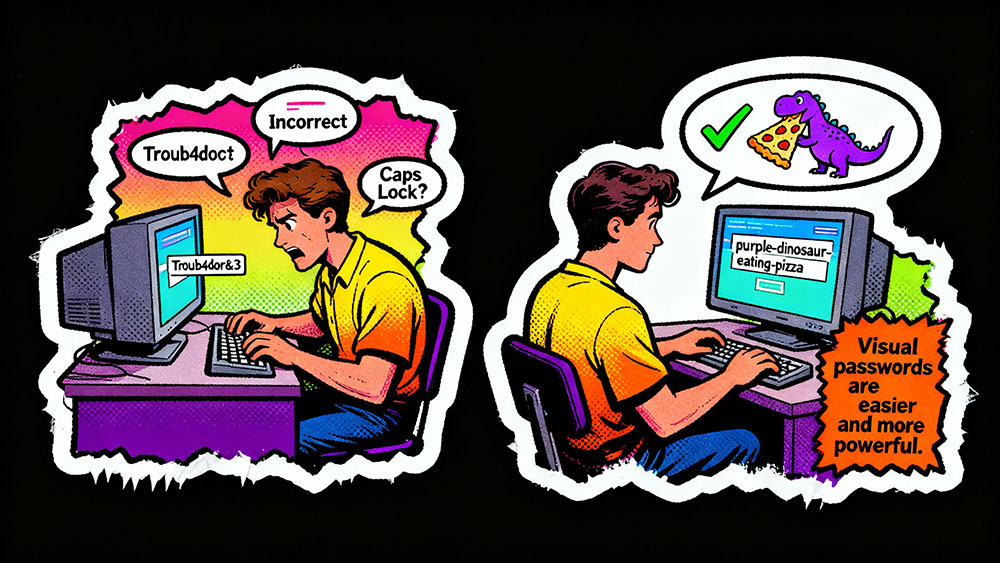
The Password Paradox
We are told to create passwords that are long, complex, and random. "Use at least 12 characters, capital letters, numbers, and symbols," the IT department says. So we create "Tr0ub4dor&3". It looks secure. It feels secure. But it is actually terrible.
The problem is that human brains are not random number generators. When we try to be random, we are predictable. We use leet speak (E becomes 3). We capitalize the first letter. We put an exclamation mark at the end. Hackers know this. Their cracking algorithms (like Hashcat) are optimized to guess these exact patterns in milliseconds.
Worse, because these passwords are hard to remember, we reuse them. Or we write them on a sticky note. The quest for "complexity" actually weakens our security. The solution is not to be more complex, but to be more entropic while staying memorable.
The "Correct Horse Battery Staple" Method
In a famous XKCD comic, Randall Munroe proposed a radical idea: instead of a short, complex password (like `J4fS<2`), use a passphrase made of four random common words (like `correct horse battery staple`).
Why does this work?
1. Length beats Complexity: Mathematically, length is the most important factor in password strength. A 25-character password made of only lowercase letters is exponentially harder to crack than an 8-character password with symbols. Each additional character multiplies the search space.
2. Memory: Our brains are wired for narrative. "Correct horse battery staple" paints a picture. It is a story. You can remember it instantly. You will never remember `J4fS<2` without checking your notes.
3. Typing Speed: You can type four words much faster than you can hunt-and-peck for the ampersand key.
How to Generate a Passphrase
You cannot just pick four words from your head. If you pick "Blue Sky Green Grass," that is predictable. Humans are bad at randomness. You need a source of entropy (randomness).
The Dice Method (Diceware)
1. Get a standard 6-sided die.
2. Roll it 5 times to get a 5-digit number (e.g., 41523).
3. Look up that number in the official Diceware word list (a list of 7,776 common English words).
4. Write down the word.
5. Repeat 4 or 5 times.
This generates a truly random passphrase. Because the words are chosen by the dice, not your brain, they have high entropy. Yet, because they are English words, you can memorize them using a mnemonic device.
Example: "purple dinosaur eating tacos"
This is random, long (27 characters), and unforgettable.
Using a Strong Password Generator Tool
If you don't have dice, use a Strong Password Generator. Look for one that has a "Passphrase" or "Memorable" mode.
Configure it to:
- Generate 4-5 words.
- Use a separator (like a hyphen or space).
- Optionally capitalize the first letter of each word (CamelCase).
Result: `Radio-Network-Pizza-Galaxy`
This password would take a supercomputer centuries to crack, but you can memorize it in 30 seconds.
The "Personal Algorithm" Strategy
If you absolutely must use a standard password (some legacy sites limit length to 12 chars), create a personal algorithm. Do not memorize passwords; memorize the rule.
Rule: "Take the third letter of the website name, capitalize it, add my dog's birthday, and end with the website category."
For Facebook:
- Site: Facebook -> C
- Dog: 1104
- Category: Social
- Result: `C1104Social`
For Amazon:
- Site: Amazon -> A
- Dog: 1104
- Category: Shop
- Result: `A1104Shop`
This gives you unique passwords for every site, but you only have to remember one rule. (Note: A password manager is still better, but this is a good backup for when you can't access it).
Conclusion
The era of `P@ssw0rd1` is over. Stop fighting your own brain. Embrace length over complexity. Use a generator to give you random words, weave them into a silly story in your head, and you will never get locked out of your account again.