
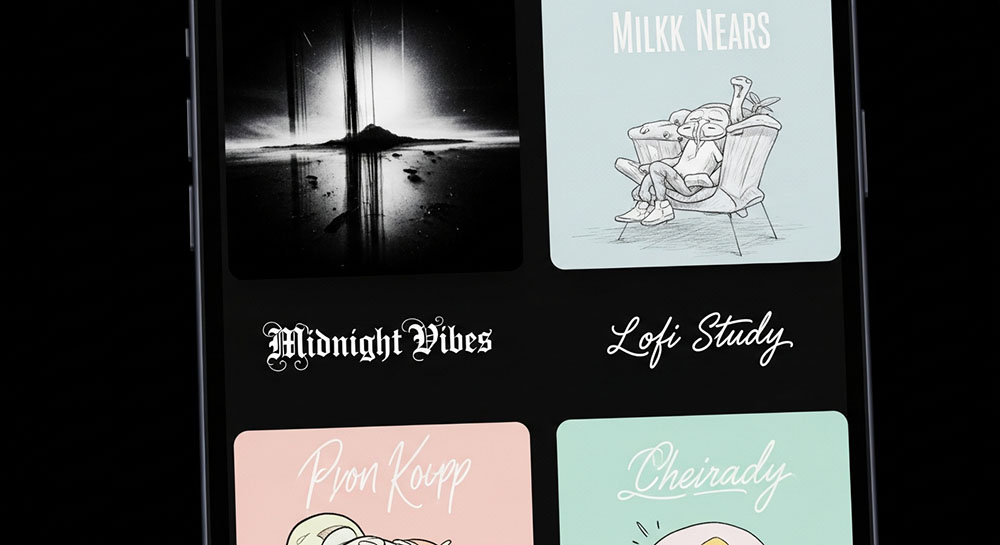
The Aesthetic of the Playlist
Spotify isn't just a music player; it is a social network. People share playlists, follow curators, and judge you by your "Recently Played." If you put effort into curating the perfect vibe for a playlist, the title should match that energy.
Standard text is fine, but it is neutral. A playlist titled "Sad Songs" hits differently than one titled "𝒔𝒂𝒅 𝒔𝒐𝒏𝒈𝒔" or "S A D S O N G S".
Matching the Vibe
Chill / Lo-Fi: Use lowercase, spaced out text or monospace. It feels relaxed and digital.
Example: l a t e n i g h t v i b e s
Metal / Rock: Fraktur (Gothic) text is almost mandatory here. It looks jagged and aggressive.
Example: 𝕳𝖊𝖆𝖛𝖞 𝕸𝖊𝖙𝖆b
Pop / Party: Bubble text or bold sans-serif. It feels loud and bubbly.
Example: Ⓟⓐⓡⓣⓨ Ⓐⓝⓣⓗⓔⓜⓢ
Classical / Study: Serif italics. It looks like a book title.
Example: 𝑆𝑡𝑢𝑑𝑦 𝑆𝑒𝑠𝑠𝑖𝑜𝑛
The Searchability Problem
This is the most important trade-off. If you name your playlist "𝕽𝖔𝖈𝖐", and someone searches for "Rock", Spotify might not find your playlist. The search algorithm looks for specific letters, and to the computer, "𝕽" is not "R".
If you want strangers to find your playlist via search, you have two options:
- Hybrid Title: "Rock Hits | 𝕽𝖔𝖈𝖐 𝕬𝖓𝖙𝖍𝖊𝖒𝖘". Keep the searchable keyword in plain text.
- Description Field: Put the fancy text in the title for looks, but put the keywords ("Rock, Metal, Guitar") in the playlist description.
Description Formatting
Don't forget the description box! You can't use bold or italic markdown in Spotify descriptions, but you can paste Unicode characters. It is a great place to add a tracklist, a quote, or a mood board using styled text and emojis to give your listeners the full experience before they even hit play.